JavaScript disabled

This website requires JavaScript to function properly.
Please enable it in your browser and reload the page.

Download Workflow | MaGeSY ®™⭐
🎵 MaGeSY® R-EVOLUTiON™⭐⭐⭐

  • Chop Suey v1.40 AAX VST3 x64 WiN-R2R
    March 29th, 2026 ⚡
    Categories:

    Chop Suey v1.40 WiN-R2R-MaGeSY

    Chop Suey v1.40 WiN

    Team R2R | 29 March 2026 | 37.47 MB

    Ultimate Workflow

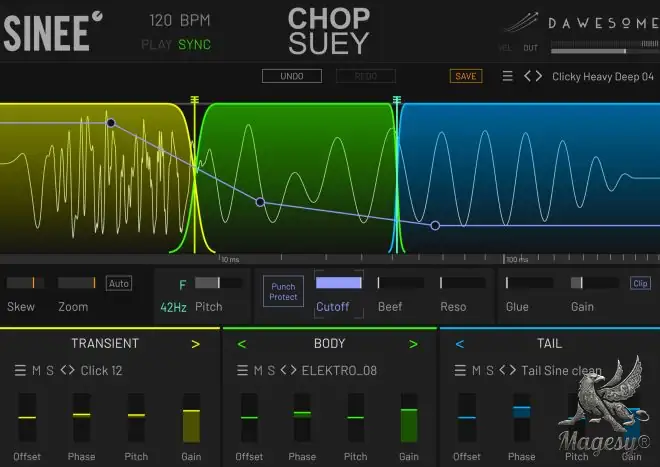
    We’ve all been there: you browse through hundreds of kicks, but nothing really works. One has a nice transient, another one a cool punch in the face and the third has the perfect boomy tail. But once you layer them the result is a weak muddy mess: layering kicks is rarely successful. Chop Suey is the solution: instead of layering, the elements are sequenced. This method eliminates phasing issues while allowing the combined kick to maintain the crisp transient, the punch of the body and the characteristic tail.


    Viewed 4331 By Music Producers & DJ´s.


  • Full Music Production Workflow Mix, Mastering In Fl Studio TUTORiAL-MaGeSY

    Production Workflow Fl Studio

    P2P | 30 May 2025 | 2.35 GB

    Watch a full EDM track come to life – from the first kick to the final master. This course is a real-time breakdown of how I create professional EDM music in FL Studio. You’ll sit right beside me (virtually) as I build a track from scratch, showing you every technique, decision, mistake, and fix. We will obviously go back and forth as one decision can affect another in production, but still, there is a continual, streamlined production process you can surely understand and uncover. I’ll explain what each action does and why. No theory overload just a creative process from idea to master. You’ll see how I work through problems, build cohesion, and make fast decisions that lead to a finished song – something that you will also be able to do, because by the end you’ll feel confident doing it yourself. Grab your headphones, maybe a coffee – and let’s roll.


    Viewed 26424 By Music Producers & DJ´s.


  • Build a Pro Home Studio Acoustics Gear Workflow TUTORiAL-MaGeSY

    Build a Pro Home Studio

    P2P | 11 February 2026 | 6.45 GB

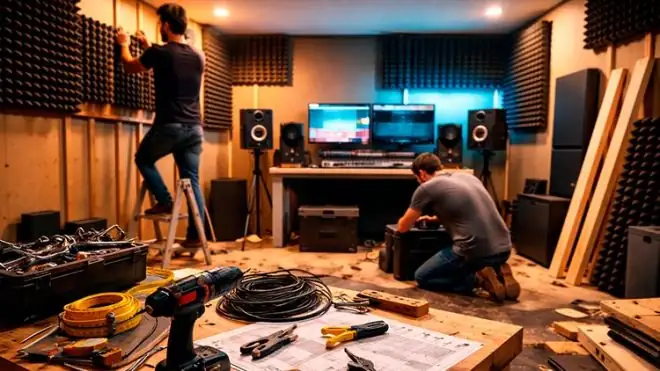
    Build a professional home studio that sounds great, works fast, and impresses clients. In this practical course you’ll learn how to plan your room layout, choose the best location, and apply the right acoustics—separating acoustic treatment (panels, bass traps, reflection control) from sound isolation (noise containment and structural issues).  You’ll run simple room tests to identify frequency build-ups and reverb problems, then create a step-by-step treatment plan that fits your space and budget. We’ll compare core studio gear—audio interfaces, microphones, studio monitors and headphones—so you can buy smart and avoid bottlenecks. You’ll configure reliable signal flow and gain staging for clean recordings, map a tidy DAW session, and adopt an efficient workflow that scales from demo ideas to paid work. Organization matters, so you’ll learn file management, color coding, templates, and checklists that keep every project moving.


    Viewed 4836 By Music Producers & DJ´s.


  • Akai MPC 3 Complete Workflow Guide TUTORiAL
    November 5th, 2024 ⚡
    Categories:

    Akai MPC 3 Complete Workflow Guide TUTORiAL-MaGeSY

    Akai MPC 3 Complete Guide

    P2P | 05 November 2024 | 6.46 GB

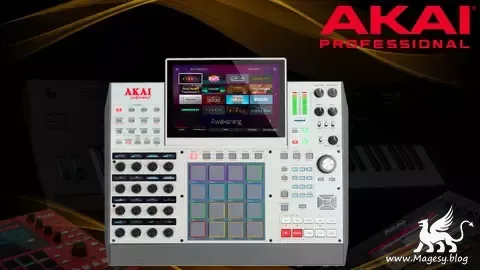
    Whether you are a new, or an existing device user transitioning to the new MPC 3 Firmware, we will teach you the workflow on how to get started with your device, to become an expert user of MPC devices. You can pick up any Akai MPC device running on MPC 3 Firmware at the end of the course and make beats with an enhanced workflow end-to-end. This course is tailored towards the users of the following Akai MPC series; MPC One, MPC X, MPC Live, and MPC Key Series running on the new MPC 3 Firmware Update. Hence, for better retention, you must have at least one of the above-mentioned devices in your possession to practice along with the teachings in this course. The course project materials and sound kits used in the course will be attached to the resource section where you can download and practice along.


    Viewed 42532 By Music Producers & DJ´s.


  • Creative Techniques In Ableton Live TUTORiAL
    October 12th, 2023 ⚡
    Categories:

    Creative Techniques In Ableton Live Tutorial Magesy

    Creative Techniques In Ableton

    P2P | 12 October 2023 | 6.22 GB

    English | Duration: 103 Lectures ( 10h 5m )

    The Procrastinators Bible : Master Ableton Live’s Creative Techniques, Workflow Efficiency, and Sound Design. Do you ever find yourself staring at a blank project in Ableton Live, eager to create music but unsure where to begin? You’re not alone. Many aspiring producers face the daunting challenge of that empty canvas, struggling to find the inspiration and direction needed to start a track. That’s where “101 Creative Ways to Start a Track in Ableton Live” comes to your rescue.Unlock Your Creative Potential:This course is designed to provide a creative spark for musicians of all levels, from absolute beginners to experienced producers seeking fresh inspiration. We understand that the first step in music production can be the most intimidating one. That’s why we’ve curated a comprehensive guide to help you overcome this hurdle.Discover 101 Unique Approaches:Our course is not just about teaching you how to use Ableton Live; it’s about igniting your creativity. We delve into 101 distinct and innovative ways to jump start your new project or pick you up from an ongoing track thats hit a brick wall, using Ableton Live’s powerful tools to their fullest potential.


    Viewed 12871 By Music Producers & DJ´s.


  • Advanced AKAi MPC Workflow Guide TUTORiAL
    October 10th, 2023 ⚡
    Categories:

    Advanced Akai Mpc Workflow Guide Tutorial Magesy

    AKAi MPC Workflow Guide

    P2P |◙ 10 October 2023 | 3.23 GB

    English | Duration: 31 Lectures ( 2h 27m )

    Master Sampling, Sound Design, Sound Effects, Filters, and Improve Workflow Speed on any Akai MPC. This course will teach intermediates who already have workaround experience of the Akai MPC hardware workflow how to take their skill to the next level and become expert users of MPC devices. At the end of the course, you will be able to pick up any Akai MPC device and make beats with an enhanced workflow end-to-end. This course is tailored towards the users of the following Akai MPC series; MPC One, MPC One+, MPC X, MPC X Special Edition, MPC Touch, MPC Live, MPC Live 2, and MPC Key 61.Hence, for better retention, it is important that you have at least one of the above-mentioned devices in your possession to practice along with the teachings in this course. The course project materials and sound kits used in the course will be attached to the resource section where you can download and practice.If you are new to Akai MPCs we advise you to enroll in our previous course which will take you from a beginner to intermediate level comfortable enough to make beats with your devices. We will walk you through understanding Filters, Sound Design, Sound Effects, Automation, advanced Sample Editing features, workflow enhancement button shortcuts, and lots more.


    Viewed 15242 By Music Producers & DJ´s.


  • Workflow Akai Professional Mpc Complete Guide Tutorial Magesy

    Workflow Akai Professional MPC

    P2P | 07 JUly 2023 | 7.5 GB

    Language: English | Duration: 39 Lectures ( 5h 43m )

    Make beats, Sample, Improve Workflow Speed, Learn button Shortcuts, Automate, and Mix on any Akai MPC. This course will teach beginners who are new to the Akai MPC hardware workflow how to get started with their device, to become an expert user of MPC devices. At the end of the course, you will be able to pick up any Akai MPC device and make beats with an enhanced workflow end-to-end. This course is tailored towards the users of the following Akai MPC series; MPC One, MPC One+, MPC X, MPC X Special Edition, MPC Touch, MPC Live, MPC Live 2, and MPC Key 61.Hence, for better retention, it is important that you have at least one of the above-mentioned devices in your possession to practice along with the teachings in this course. The course project materials and sound kits used in the course will be attached to the resource section where you can download and practice along.We will walk you through the process of how to set up your device, how to make your first beat, how to bring in your own sound, how to sample, how to edit on grids, Timing-correct, how to initiate automation, how to use effects, mixing and mastering, routing, sample editing, MPC workflow structure, sample layering, track mutes, arranging sequence into songs, QLink, note repeats, lots of workflow enhancement button shortcuts, and lots more.


    Viewed 16920 By Music Producers & DJ´s.


MaGeSY TeleGram Subscribe & Stay up to date with all the Posts that are published in MaGeSY MaGeSY Podcast: Subscribe & Stay up to date with all the Audio Posts that are published in MaGeSY MaGeSY Instagram Official MaGeSY-Youtube Official MaGeSY-X Official MaGeSY-Facebook Official Social Networks:MaGeSY-Pinterest Official MaGeSY-WhatsApp Channel Official  MaGeSY-TiK-TOK Channel Official

Total Posts: ❨ 🎵➡35 ❩ | Paged: ➡ 0


ಮ್ಯಾಜೆಸ್ಯ್